Rolanstar TV Stand with Power Outlets: organize your media

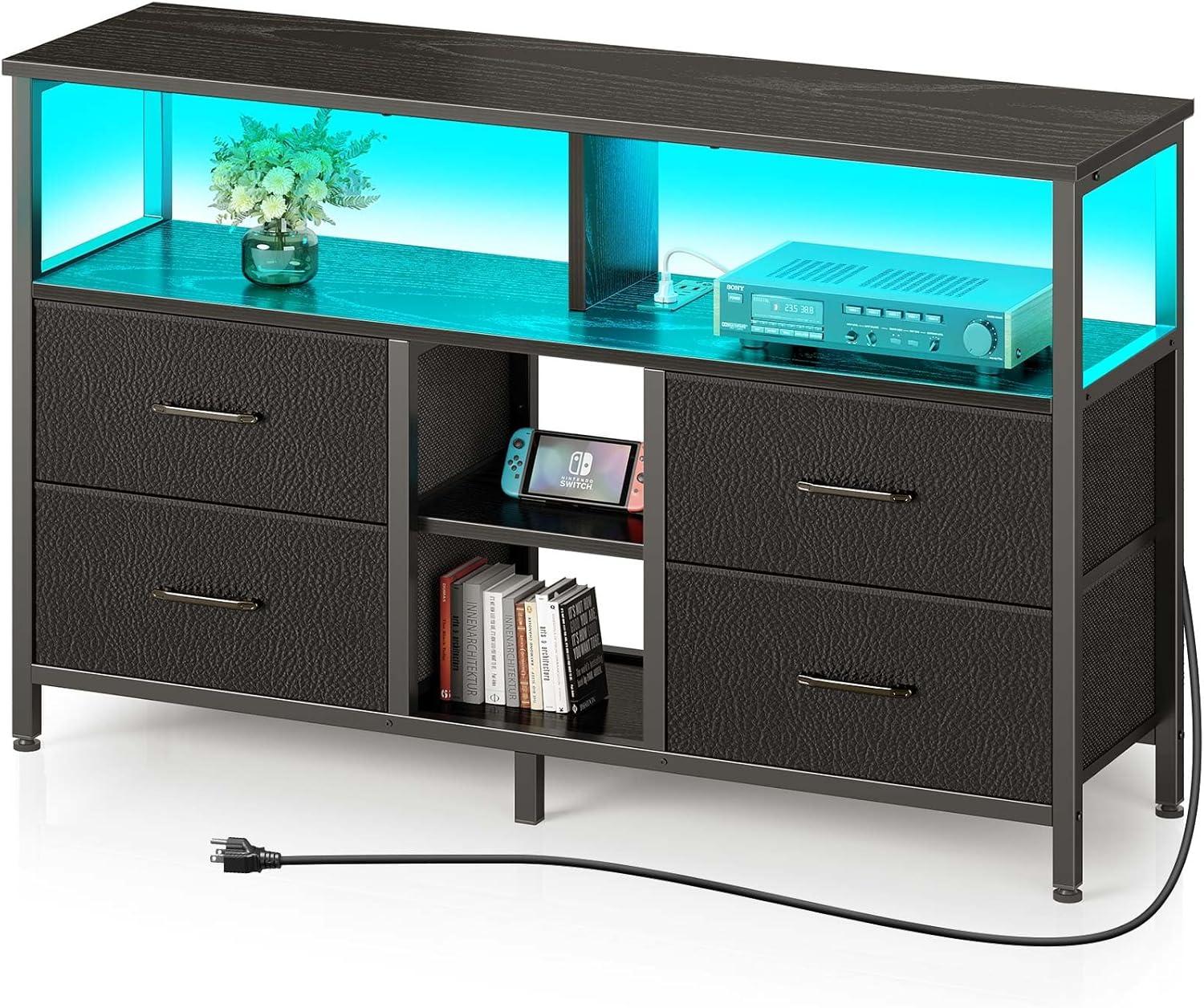
The LED strip catches your eye first, washing a soft color along the black surface and changing how the whole wall reads after dusk. The Rolanstar TV Stand with Power Outlets and LED Light — or simply the Rolanstar media console — has a low, blocky presence that feels heavier than its footprint suggests. Slide a hand over the top and the PU-finished board is smooth and slightly cool; pull a fabric drawer and it answers with a muffled, textile thud. Cables disappear into a narrow vertical slot and the open shelves break the mass just enough, so the piece reads like something lived-in rather than staged.
A first look at the Rolanstar TV stand and what it brings to your room
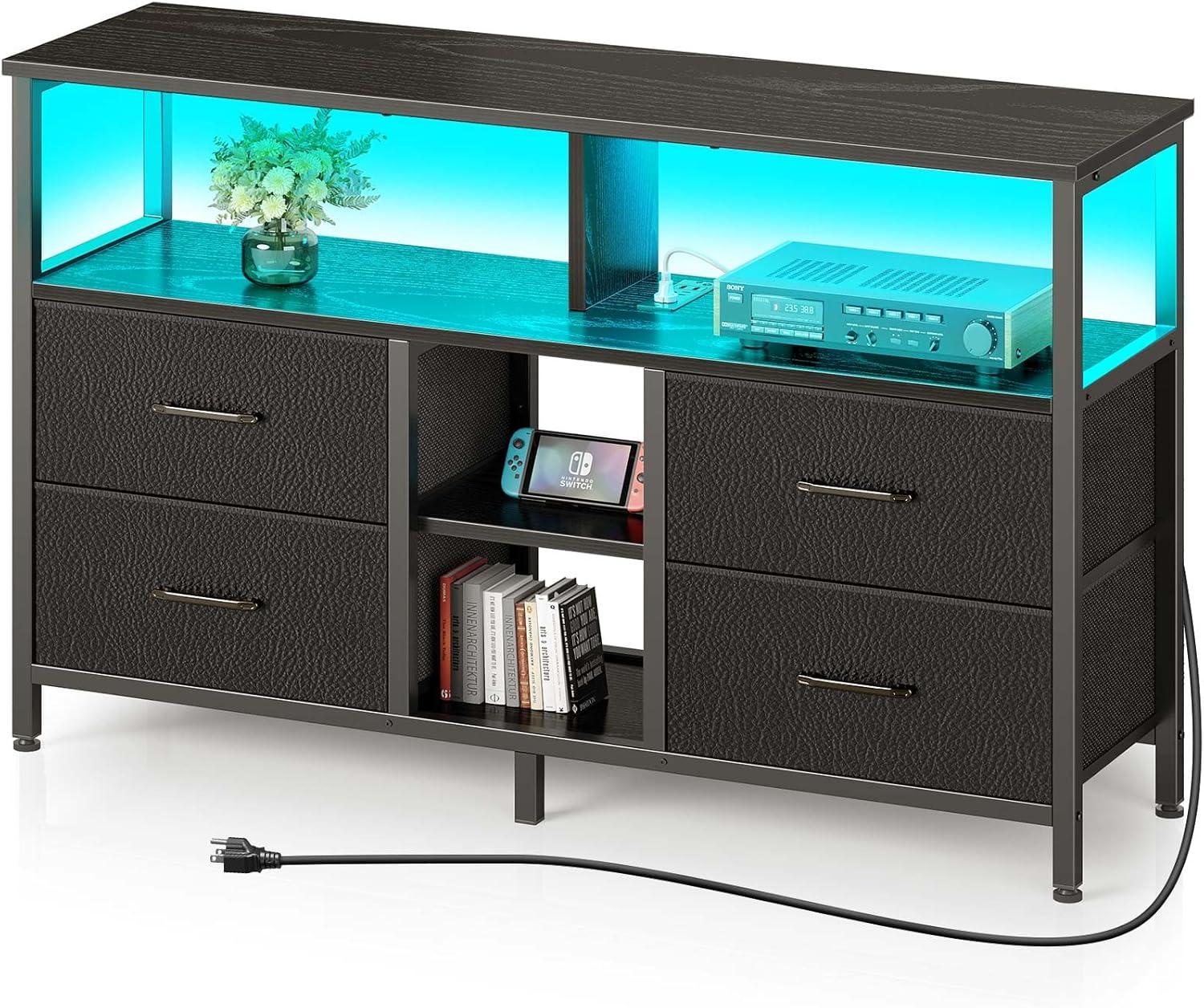
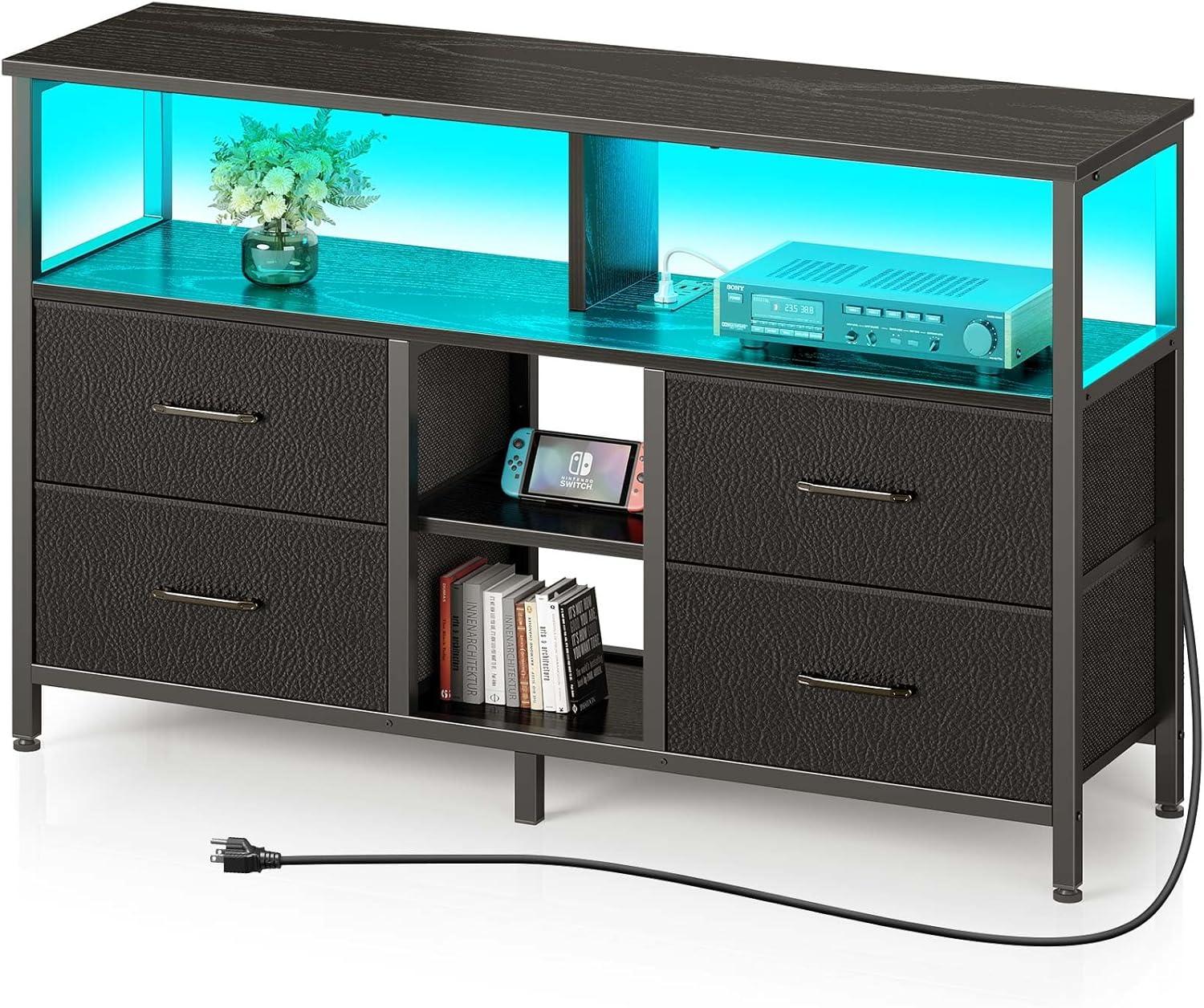
When you first place the unit in your living area, it reads immediately as a focal point beneath the screen — a low, horizontal mass that anchors the TV and organizes the devices around it. The dark finish and mix of open surfaces and enclosed compartments give the wall a settled,intentional look: cables are less visible from the front,controllers and small items tuck away,and decorative objects find a neat stage. The built‑in lighting changes that impression after dark, casting a soft band of color on the wall behind the set and turning an ordinary viewing session into something a bit more atmospheric. A few everyday behaviors show up quickly: you’ll fiddle with light colors until one feels right for the room,you’ll shift game consoles or a soundbar on the top shelf to find a good fit,and small adjustments to cable routing tend to happen during the first few days of use.
Visible effects in daily use include both aesthetic and practical changes to the space.
- Ambiance: the LED lighting introduces a background glow that changes how the wall and television read at night
- Tidiness: front-facing clutter looks reduced as cords and devices are directed toward the back
- Surface use: the top becomes a staging area for a lamp, a plant, or frequently used remotes
Having mentioned that, the lighting creates accents rather than room illumination, and the piece does occupy a clear horizontal band on the wall that will shift the balance of a smaller room. In everyday life you’ll find yourself reconfiguring small items and tweaking the lights or cable routing as habits settle in; those minor adjustments are part of the stand’s contribution to how the space feels and functions.
| Observed feature | Typical in‑room effect |
|---|---|
| Integrated lighting | Soft backlight behind TV, changes mood in low light |
| Cable management/hidden rear access | Cleaner front view with devices kept out of sight |
| Flat top surface | Extra place for lamps, décor, or everyday items |
Unboxing and setup: what you find in the package and how assembly unfolds for you
when you open the box, the first thing you notice is the way the components are sectioned off — larger panels wrapped in foam and several smaller packets tucked into corners. The instruction booklet sits on top; parts are labeled with stickers that match the diagram references,and there’s a single clear plastic bag containing the fasteners and the small allen wrench. Included in the box:
- Top panel, side panels, and shelf pieces (wrapped)
- four fabric drawers (folded)
- Hardware packet with labeled bags
- Instruction manual and an allen key
- LED strip, remote, and power cable tucked separately
A short table on one page of the manual maps part letters to illustrations, which makes it straightforward to check you haven’t missed anything before you start.
Assembly unfolds as a step-by-step puzzle: you lay out the labeled pieces, sort the screw packets by letter, and follow the illustrations while loosely fastening a few key connections before tightening everything. In practice you’ll reach for the allen key for most fasteners but switch to a Phillips screwdriver for a couple of self-tapping screws; some steps ask you to lift and align larger panels, so having a second set of hands for the final joins can save time. There’s a small opening in the back panel where the LED and power cable pass through; routing those wires as you assemble helps keep the interior tidy and avoids unthreading later. The manual includes a short checklist at the end to confirm all fasteners are snug and drawers slide freely, and you’ll probably pause once or twice to compare the drawings with the physical panels under different light.
| Part reference | What to check |
|---|---|
| Label A–D panels | Match sticker to diagram before aligning |
| Hardware bags | Sort by letter; count before use |
| LED/power components | Keep accessible during assembly for routing |
Close inspection of the materials, LED trim and fabric drawers and how they feel to you
When you run your hand over the stand, the top has a firm, slightly matte finish that feels closer to coated engineered wood than natural grain — it resists small scratches and doesn’t show fingerprints immediately, though dust is noticeable after a day or two. The LED trim itself sits behind a thin plastic diffuser that feels smooth and a touch flexible; when the lights are on the glow softens against the diffuser so you notice a warm band rather than a harsh strip of bulbs. The fabric drawers have a textile give to them; the outer PU-backed layer is smooth where it faces you, while the woven sides give a faint, textured impression when you slide a finger along them. Reaching for a drawer you will likely adjust the fabric a little to line it up,and the drawers tend to shift slightly in their openings if you pull at an angle,which is one of those small,habitual tugs you end up doing without thinking. A few speedy notes you’ll feel at first touch:
- top finish: smooth, low-gloss, cool to the touch
- LED diffuser: thin, slightly springy plastic that spreads light evenly
- drawer face: soft PU layer with underlying textile texture
- Slide action: light resistance, occasional realignment needed
| Component | How it feels to you / Note |
|---|---|
| Top surface | Firm and even, with a restrained sheen; not slick, and it gives a cool sensation when you first touch it. |
| LED trim & diffuser | Smooth plastic that diffuses light into a soft band; the edge is unobtrusive under hand but not heavily cushioned. |
| Fabric drawer face | Textile give with a PU-facing smoothness; feels more pliable than rigid storage bins. |
| Drawer structure | Lightweight and flexible — the drawer walls compress a bit when you load them and the bottoms can bow slightly under uneven weight. |
How it fits your space, the dimensions that matter and the TV sizes you can place on it
The unit’s footprint and load capacity are the primary things that determine how it will occupy a room. The desktop runs roughly the length of a small console, so a 32″ or 45″ television will sit well within the top surface with room on either side for a soundbar or small décor; a 55″ set approaches the limits of the desktop width and frequently enough leaves only a narrow margin at the edges.Depth influences how far the cabinet sits out from the wall and whether bulky game consoles or larger soundbars can share the shelf without blocking airflow; the listed weight capacity also matters for heavier flat-panels and all-in-one soundbar mounts. observationally, the arrangement tends to feel balanced when the screen’s base sits entirely on the desktop; when the screen’s feet are wide-set they can require minor adjustments or a different placement pattern. Key measurements that affect placement are:
- Desktop length: governs side clearance and how much the TV overhangs
- Depth: determines how much equipment can sit in front of or behind the screen
- Height: sets viewing center relative to typical seating
- Weight capacity: indicates whether heavier panel-plus-accessory combos will be supported
A quick reference helps clarify typical TV widths against the console’s usable top. The table below lists common diagonals with approximate screen widths and a neutral note on fit—these are general tendencies since bezel design and stand footprint vary by model. For some households a 55″ will align almost exactly with the tabletop edge and can feel snug; in other setups the same size will overhang slightly and prompt placement a few inches off-center or a wall-mount instead. The presence of integrated power outlets can reduce the need to tuck adapters behind the unit, which changes how close larger devices are positioned to the rear edge.
| TV Diagonal | Approx. Screen Width | Observed Fit on Desktop |
|---|---|---|
| 32″ | ~28″ | Fits comfortably centered with side clearance |
| 45″ | ~39″ | Good fit; room for small accessories beside the screen |
| 55″ | ~48″ | Approaches full width; may sit edge-to-edge or overhang slightly |
View full specifications and current configuration details on the product listing
How it measures up to your expectations and the limits of your space
In everyday placement,the unit tends to occupy a modest footprint that often works against a wall or beneath a mounted screen without commanding the room. The built-in outlets and the vertical insertion of plugs limit the need to run extra extension cords across floor space, which can make cable clutter less noticeable; at the same time, the LED strip alters perceived depth, especially in dim lighting, and can draw attention to dust or scuffs along the top edge. Small interactions — pulling a fabric drawer to reach a remote, angling a router on an open shelf, or nudging the console a few inches to achieve a balanced sightline — are common and generally straightforward, though front clearance is needed for full drawer access in tighter layouts.
- Cord routing: internal outlets reduce external wiring but concentrate cables inside the cabinet, so back access or temporary rearrangement can feel a bit fiddly.
- Drawer behavior: fabric drawers compress when pushed into deeper shelving, which can limit how items stack inside.
- lighting impact: RGB illumination shifts how nearby walls and furnishings read, sometimes making the console appear more prominent than its actual size.
| Spatial constraint | Typical effect |
|---|---|
| Limited front clearance | Requires a few extra inches for drawer removal or cleaning |
| Tight interior depth | Devices sit closer to the front edge or require angled placement |
The observations above tend to surface during routine use rather than at first glance; small adjustments to placement and the arrangement of devices frequently resolve them without major changes. See full specifications and available configurations on the product listing
Living with it day to day: how you manage cables, use the power outlets and pack the drawers
Living with the unit, you quickly develop small habits around the wiring. You tend to route the thicker TV and console cords through the rear gap so they sit largely out of sight, leaving the USB chargers plugged in for overnight phone or tablet top-ups. The built-in outlet module sits in one vertical spot behind the shelves, so you often stagger devices across the two AC sockets and the two USB ports rather than piling everything on a single lead. Cables get bundled with a couple of twists or Velcro straps and tucked along the inside edge; every now and then you fish one out to swap a device, which is easy as most cords have a little slack where they loop inside the cabinet.Typical items you keep powered from those outlets include:
- TV and streaming box
- Wi‑Fi router
- Game console or soundbar
- Phone/tablet chargers
Packing the four fabric drawers becomes a practical, everyday routine rather than a once-off decision. You use one drawer for frequently handled items like remotes and controllers, another for charging cables and small power adapters, a third for media or instruction manuals, and the fourth for odds and ends — earbuds, spare batteries, HDMI leads that aren’t in use. Because the drawers are soft-sided, things can shift when you open them, so you’ll often wrap tiny cable bundles with rubber bands or tuck them into small pouches before stashing them; that also helps avoid the occasional tangle. the table below shows a simple way these drawers often end up arranged in day-to-day use:
| drawer | Common contents | Practical note |
|---|---|---|
| Top left | Remotes, controllers | Easy access from the couch |
| Top right | Chargers, short cables | Kept near the outlet module |
| Bottom left | Manuals, discs, spare cables | Less-frequent items |
| Bottom right | Miscellaneous (batteries, earbuds) | Great for small pouches |
How It Lives in the Space
Over time you notice the Rolanstar TV Stand with Power Outlets and LED Light, 4 Fabric Drawers Entertainment Center for 32/45/55 inch TVs, Media Console with Storage for Living Room or Bedroom, Black settles into the room more than it makes a statement. in daily routines you see how it shapes small habits—where a cup is left, how the fabric drawers soften with handling, and the faint wear that appears on the surface from ordinary use. It becomes part of the background of comfort, quietly present in regular household rhythms. In quiet moments it simply stays.